Paper Planner or Calendar App for a Changeable Week?
Paper planner or calendar app: compare visible weekly space with easy rearrangement, then choose a planning method that fits how often plans shift.
A paper planner or calendar app works best for a changeable week when its weak point is not the one causing trouble. Paper gives the week a visible shape; a digital calendar makes moving an appointment less fiddly. The choice depends less on which tool is better and more on how often your plans change, and what those changes do to the rest of the day.
Start with the kind of change that disrupts your week
Not every change creates the same planning problem. A meeting that moves once is different from a workday repeatedly interrupted by urgent requests. Before switching tools, notice what you actually need to revise.
- Fixed commitments move occasionally: either format can work. Paper may be enough if you can clearly cross out and rewrite an entry.
- Appointments shift often: a digital calendar is easier to revise, especially when events have reminders or involve other people.
- The day is rearranged around interruptions: a paper weekly view can make the remaining open space easier to see at a glance.
- You plan across several locations or devices: a calendar app is generally more convenient than carrying a notebook and copying changes between places.
Count the friction, not the changes. If a move takes a moment but leaves you uncertain about what else must move, the real difficulty is keeping related commitments visible. If you can see the knock-on effects but dread rewriting a crowded page, the problem is revision itself.
Paper becomes hard to read after repeated changes
In a paper planner, each revision stays on the page. Cross-outs, arrows and cramped replacement notes can turn a useful weekly view into a small archaeological site. This tends to happen when several events move, not simply because paper is inherently unsuited to change.
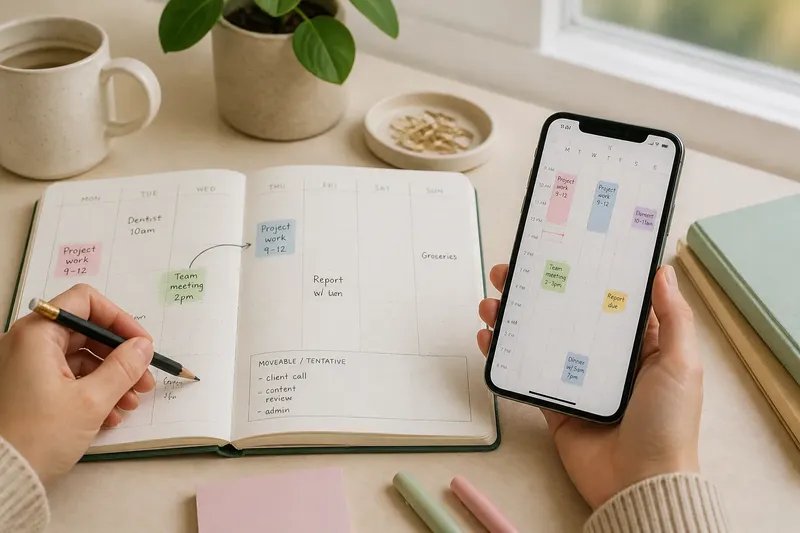
Try reserving the planner for the shape of the week rather than every tentative detail. Write fixed commitments plainly, and mark movable blocks lightly in pencil. If an event changes, erase or move that block while leaving the fixed entries intact. A clean page is useful only if it helps you decide what can still fit.
Say you have a weekly spread in a notebook, a dentist appointment on Tuesday and a work block that may move. If the work block shifts to Thursday, erase and rewrite that block, then check whether Thursday still has room for the tasks attached to it. The observable result should be a readable week with the displaced work visible, rather than a trail of arrows that only makes sense to you.
If the planner is still becoming crowded, stop recording every possible version of the day. Put uncertain work in a separate “moveable” area and write it into a time slot only when it is agreed. A paper page is like a small table: it is easier to use when you do not keep piling every possible object on it.
A calendar app makes rearrangement easy but hides the overall shape
Digital events can usually be dragged, edited or cancelled without rewriting a page. That convenience has a cost: a week with many short entries may be easier to manipulate than to understand. Scrolling through a phone screen can conceal the long gaps and crowded stretches that are obvious on a full paper spread.
Try changing the calendar view before adding more reminders. A weekly view can show where appointments cluster; a day view can clarify a tightly scheduled afternoon. Use event titles that say what the commitment is, and reserve separate calendar colours only for categories you can identify quickly. A decorative legend that requires its own decoding is not doing much work.
Keep tentative plans visibly tentative. Depending on the app, that may mean marking an event as provisional, using a distinct calendar, or leaving it out until confirmed. Otherwise, an idea can acquire the visual authority of an appointment simply because it has a coloured block.
One tool cannot comfortably hold every kind of commitment
Some people need both a broad view and easy editing. A paper planner can show the week at a glance while a calendar app holds appointments that change or need alerts. The arrangement works only if each tool has a clear job and there is a reliable place to check for the current time and location of a commitment.
Choose one source as authoritative for appointments. If the app is the source, the planner can show broad work blocks without duplicating every meeting. If the planner is authoritative, keep the app for reminders or shared invitations rather than maintaining a second full schedule. Two complete calendars invite a quiet disagreement, usually discovered when one is already out of date.
When an event changes, update the authoritative calendar first. Then adjust any broad plan that depends on it. This keeps copying limited to the decisions affected by the change, instead of turning each edit into a full rescheduling exercise.
Which planning setup fits this kind of change?
Is paper better when I want to see the whole week?
It can be, particularly if your planner opens to a two-page weekly spread and you use broad blocks rather than writing every task into a slot. Check that the page has enough room to record changes legibly before relying on it for a busy week.
Is a calendar app better for frequent changes?
Usually, if appointments move often or need alerts, because editing an event is simpler than rewriting it. It may still help to check the week view after a change so the revised schedule remains understandable as a whole.
Should I use a planner and an app together?
Use both only when they serve different purposes, such as a paper overview and a digital record of appointments. Decide which one is authoritative; otherwise, every change creates a second task: working out which version is current.
What if I cannot tell how often my plans shift?
For a short stretch, mark each moved commitment with a simple pencil symbol or a note in your calendar. At the end, look for whether changes were occasional, frequent, or mostly tentative plans becoming confirmed ones; choose the tool that made those particular changes easiest to manage.
Choose by the work of keeping the week current
For a mostly stable week, a paper planner may offer enough flexibility while keeping the whole schedule in view. For frequent appointment changes, a calendar app can reduce the effort of editing and help keep reminders attached to the right event. If the week is both visually dense and changeable, use a deliberately limited combination rather than copying everything everywhere.
Try the smallest adjustment that addresses the actual nuisance: pencil for movable blocks, a clearer calendar view, or one agreed source for appointments. Then notice whether the next change is easier to absorb without making the rest of the week harder to read. The right paper planner or calendar app is the one that lets you see what still needs deciding, without creating a separate job out of maintaining the plan.